Mobile facial-attendance for business teams and integrated HR systems
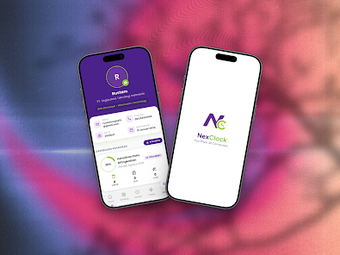
NexClock, from Segiputera Teknologi Indonesia, is a digital attendance solution built for workplace time tracking on Android devices. The app verifies identity with facial recognition for clock-in and clock-out and stores timestamped entries while synchronizing data to organizational systems. Key elements include biometric verification, real-time data synchronization, and connectors for workforce management. It targets enterprises and small to mid-sized businesses that need to replace paper or manual timekeeping with a mobile-first workflow.
What workplace task does the app target?
The app digitizes day-to-day timekeeping by capturing identity at the point of entry and producing a single searchable attendance record for payroll and compliance. Biometric verification via face recognition anchors every timestamped entry, which reduces manual reconciliation. Administrators access consolidated logs rather than scattered paper sheets, and these records feed downstream HR or payroll processes that require reliable presence data.
How does the app fit into daily attendance workflows?
Clock-in follows a short, repeatable sequence: open the app, allow camera access, capture a face sample, then submit the entry; administrators see updates quickly. That predictable cycle creates standard outputs for reporting and reconciliation. Typical outputs include timestamped logs, identity-confirmed entries, and synchronized presence records that let payroll or attendance teams reconcile rosters without manual transcription.
Is the app approachable for staff and administrators?
The interface is designed for quick clock-in and clock-out and requests standard mobile permissions such as camera access and internet connectivity. Staff need only basic mobile literacy to capture identity; administrative tasks such as roster alignment and system linking require coordination. Onboarding focuses on hardware and permission setup rather than lengthy end-user training, making daily use straightforward for employees once provisioning is complete.
Can the app scale for enterprise operations and integrations?
The app supports connectors to corporate workforce management systems and delivers attendance data in real time, which suits centralized reporting needs. It is optimized for speed and practicality in high-volume business environments, so repeated check-ins per shift are feasible. Deployment depends on device standardization and network availability across sites, so organizations should verify those operational prerequisites before large-scale rollout.
Best fit: partner networks and corporate deployments
The developer’s work on the Raja Gadai digital infrastructure suggests alignment with partner ecosystems and enterprise deployments. Organizations operating inside such partner networks gain the most value from adopting the solution; teams outside those partnerships should plan administrative coordination and integration work before rollout. The recommendation favors deployments where ecosystem compatibility and operational readiness are already in place.